> ## Documentation Index
> Fetch the complete documentation index at: https://docs.levelset.io/llms.txt
> Use this file to discover all available pages before exploring further.
# Evaluations
> Structured reviews on a cadence, and who is due
Evaluations are the scheduled, structured conversation: a Team Member review, a Trainer review, a Director review. Where ratings are a fast read on one shift, an evaluation is the sit-down.
Open **Performance > Evaluations**. Evaluations are part of the Deploy plan.
 ## The tabs
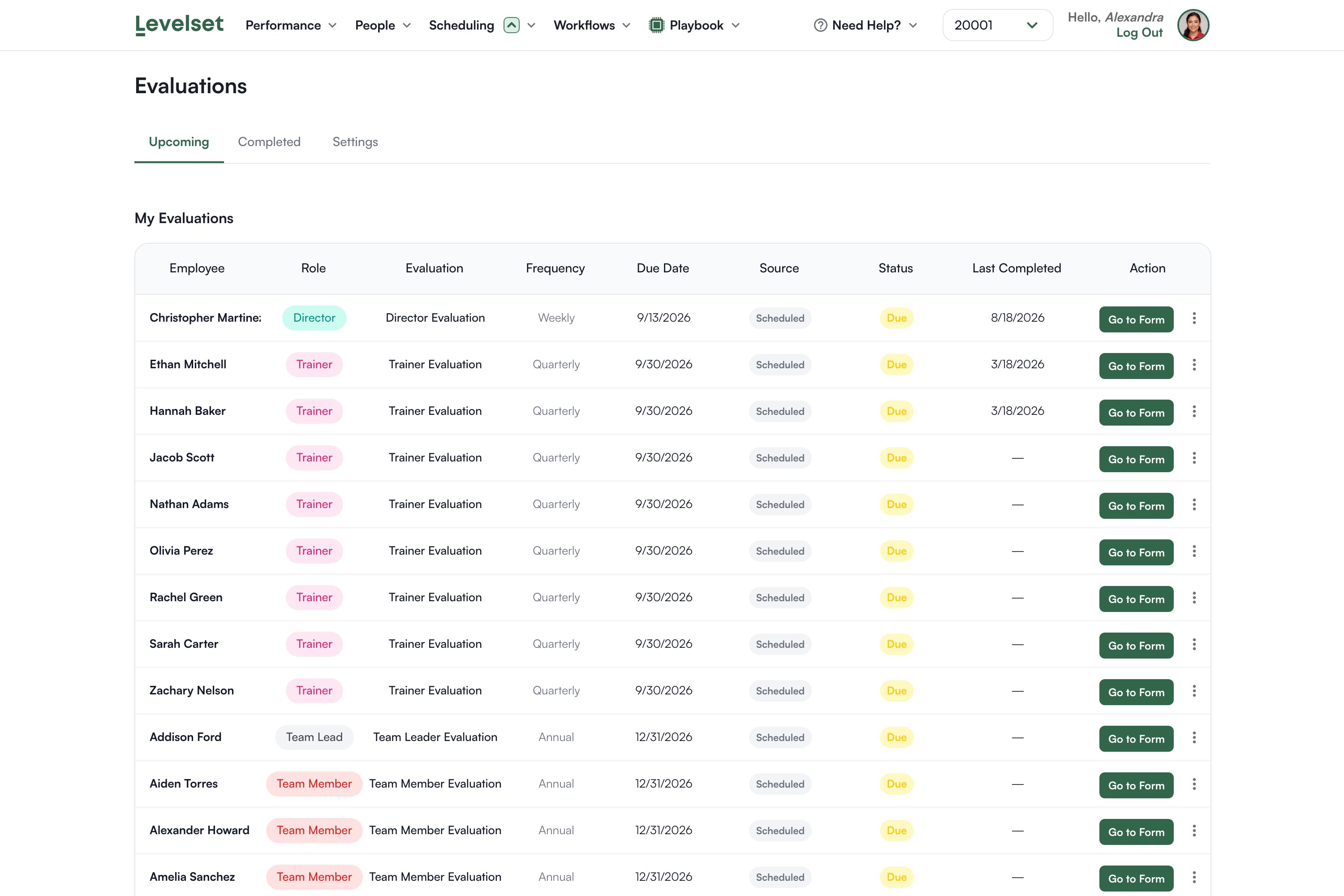
**Upcoming** is what is due. **Completed** is history. **Certifications** holds certification requests. **Settings** is where the schedule rules live.
Inside Upcoming there are two sections. **My Evaluations** is what you are the reviewer for. **All Evaluations** is everyone's, and it appears only if your permission level includes Evaluations > Manage Evaluations.
The Completed tab is not restricted the same way. Anyone who can open Evaluations can read completed reviews for the organization, so treat access to this page as access to finished reviews.
## Reading the list
| Column | What it tells you |
| -------------- | ----------------------------------------------------------- |
| Employee | Who is being reviewed |
| Role | Their role, which usually decides which evaluation they get |
| Evaluation | Which review form |
| Frequency | Weekly, quarterly, annual, and so on |
| Due Date | When it is due |
| Source | Scheduled, or added another way |
| Status | Due, upcoming, overdue |
| Last Completed | When they were last reviewed, or a dash if never |
| Action | **Go to Form** to start |
The unfiltered All Evaluations section is what an above-store leader needs, and it is the reason to grant Manage Evaluations.
## Conducting one
**Go to Form** opens the review. Work through it and submit.
The form is a Levelset form, so what it asks is whatever your organization built. See [Forms](/forms/overview).
Give yourself a real block of time. Evaluations are long by design, and it is a conversation rather than a data-entry task.
## Who reviews whom
The reviewer is decided by role: an evaluation's rules name which roles conduct it, and Levelset matches that against the reviewer's role on the roster. An administrator who is not linked to a team member record is treated as your organization's top role.
That means a promotion changes who reviews whom automatically, and it also means an evaluation can look unassigned if somebody's role is blank.
An evaluation template with no active rule names no reviewer at all, so nobody can conduct it. If a review is sitting there that nobody can start, check its rule in Settings first.
## The schedule
The **Settings** tab holds the rules that generate what you see on Upcoming: which evaluation applies to which role, how often, and when it starts. Cadences include weekly through annual, and you can require a review more than once per period.
A rule generates the due dates. Nobody has to remember that trainers are due at the end of the quarter.
## Skipping or deferring
If a review genuinely should not happen, it can be skipped or deferred with a reason rather than left to rot as overdue. The reason is kept, which is the difference between a considered decision and a gap in the record.
## Common questions
Your organization is on Measure. Evaluations is part of Deploy, so the page explains that rather than opening. You also need Evaluations > View Evaluations on your permission level.
The All Evaluations section needs Evaluations > Manage Evaluations. Without it you see what you are the reviewer for.
Its template has no active rule, so no reviewer role is named. Add or reactivate the rule in Settings.
Either no rule covers their role, or their role is blank on the Roster. Check Settings first, then the person's role.
They have never been evaluated in Levelset. That is normal for a recent rollout.
Yes. The evaluation is a form, edited in Forms. Changing questions mid-cycle makes comparison harder, so prefer changing them between cycles.
## The tabs
**Upcoming** is what is due. **Completed** is history. **Certifications** holds certification requests. **Settings** is where the schedule rules live.
Inside Upcoming there are two sections. **My Evaluations** is what you are the reviewer for. **All Evaluations** is everyone's, and it appears only if your permission level includes Evaluations > Manage Evaluations.
The Completed tab is not restricted the same way. Anyone who can open Evaluations can read completed reviews for the organization, so treat access to this page as access to finished reviews.
## Reading the list
| Column | What it tells you |
| -------------- | ----------------------------------------------------------- |
| Employee | Who is being reviewed |
| Role | Their role, which usually decides which evaluation they get |
| Evaluation | Which review form |
| Frequency | Weekly, quarterly, annual, and so on |
| Due Date | When it is due |
| Source | Scheduled, or added another way |
| Status | Due, upcoming, overdue |
| Last Completed | When they were last reviewed, or a dash if never |
| Action | **Go to Form** to start |
The unfiltered All Evaluations section is what an above-store leader needs, and it is the reason to grant Manage Evaluations.
## Conducting one
**Go to Form** opens the review. Work through it and submit.
The form is a Levelset form, so what it asks is whatever your organization built. See [Forms](/forms/overview).
Give yourself a real block of time. Evaluations are long by design, and it is a conversation rather than a data-entry task.
## Who reviews whom
The reviewer is decided by role: an evaluation's rules name which roles conduct it, and Levelset matches that against the reviewer's role on the roster. An administrator who is not linked to a team member record is treated as your organization's top role.
That means a promotion changes who reviews whom automatically, and it also means an evaluation can look unassigned if somebody's role is blank.
An evaluation template with no active rule names no reviewer at all, so nobody can conduct it. If a review is sitting there that nobody can start, check its rule in Settings first.
## The schedule
The **Settings** tab holds the rules that generate what you see on Upcoming: which evaluation applies to which role, how often, and when it starts. Cadences include weekly through annual, and you can require a review more than once per period.
A rule generates the due dates. Nobody has to remember that trainers are due at the end of the quarter.
## Skipping or deferring
If a review genuinely should not happen, it can be skipped or deferred with a reason rather than left to rot as overdue. The reason is kept, which is the difference between a considered decision and a gap in the record.
## Common questions
Your organization is on Measure. Evaluations is part of Deploy, so the page explains that rather than opening. You also need Evaluations > View Evaluations on your permission level.
The All Evaluations section needs Evaluations > Manage Evaluations. Without it you see what you are the reviewer for.
Its template has no active rule, so no reviewer role is named. Add or reactivate the rule in Settings.
Either no rule covers their role, or their role is blank on the Roster. Check Settings first, then the person's role.
They have never been evaluated in Levelset. That is normal for a recent rollout.
Yes. The evaluation is a form, edited in Forms. Changing questions mid-cycle makes comparison harder, so prefer changing them between cycles.