> ## Documentation Index
> Fetch the complete documentation index at: https://docs.levelset.io/llms.txt
> Use this file to discover all available pages before exploring further.
# Forms
> Building your own forms, and where submissions land
Forms are how you capture anything Levelset does not capture out of the box: an opening checklist, a cleaning inspection, a walkthrough, a smart shop.
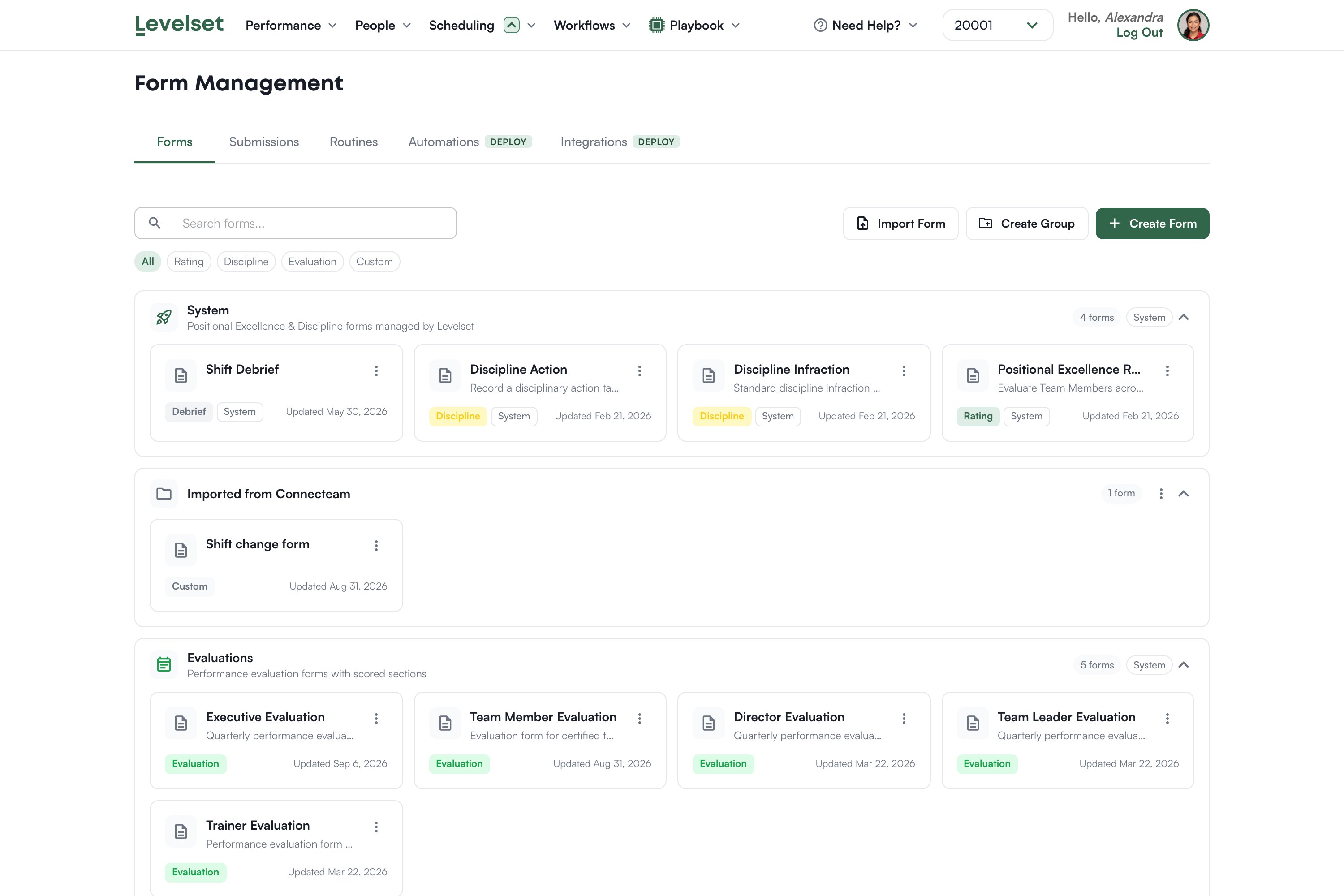
Open **Workflows > Forms**.
 ## The tabs
**Forms** is your library. **Submissions** is what has been filled in. **Routines** puts a form on a schedule, covered in [Routines](/forms/routines). **Automations** and **Integrations** are part of the Deploy plan and carry a badge saying so.
## Form groups decide the form type
This is the one thing to understand before you build anything, because it causes a specific and confusing failure.
Every form has a **type**, and the type comes from the **group** you create it in. The rule is mechanical:
| Group | Type the form gets |
| --------------------------- | ------------------ |
| A group named Evaluations | evaluation |
| A group named Shift Debrief | debrief |
| Any other group you name | custom |
Positional Excellence and Discipline groups do not accept new forms at all, because those forms are managed by Levelset.
The type then decides where the form can be used. **Routines only offer custom forms.** So a checklist built inside an Evaluations group is an evaluation, never appears when you create a routine, and nothing explains why.
The New Form dialog preselects the first group alphabetically, and in most organizations that is Evaluations. If you accept the default without thinking, your checklist becomes an evaluation and cannot be scheduled.
Always set the group deliberately. The dialog lets you create one at the same time, so name it for what the form actually is.
If you already made this mistake, you do not have to rebuild. Move the form into an ordinary group and confirm when Levelset asks about changing its type.
## Building a form
Open a form to edit it. Add fields, name them, mark them required or optional, and order them.
There is a wide range of field types, including short and long text, numbers with minimum and maximum values, single and multiple choice, dates, signatures, and photo capture. Numeric ranges and photo proof are what make a checklist worth reading later: "fridge temperature 37" and a picture beats "yes, checked".
Write questions the way you would ask them on the floor. A form nobody finishes is worse than no form.
## Editing a form that already has submissions
You can change a form freely, including changing a field's type, and past submissions are safe: each one keeps a copy of the form as it was when it was filled in, so old records still read correctly.
If a change would lose something, for example turning a multiple choice into a number, Levelset warns you and lists what goes.
## Submissions
The **Submissions** tab lists what has come in, and opening one shows the answers as submitted.
## How many forms you get
The Measure plan includes up to 10 custom forms. Deploy removes the limit. If you are at the cap, either retire a form you no longer use or talk to your Levelset representative.
## System forms
Some forms ship with Levelset and power the built-in flows: the positional rating form and the discipline form your leaders use during a shift. They are managed by Levelset rather than built by you, and they are configured through [Positional Excellence settings](/organization-settings/positional-excellence) and [Discipline settings](/organization-settings/discipline) rather than in the form editor.
## Common questions
Its group gave it a type routines exclude, almost always because the dialog defaulted to the Evaluations group. Move the form to an ordinary group and confirm the type change when asked. If the picker says there are no custom forms available, that is the same problem.
People whose permission level includes the Form Management permissions. View, create, edit and delete are separate switches. See [Permissions](/organization-settings/permissions).
Yes. Every submission stores the form as it was at the time, so past records still read correctly. Levelset warns you if a particular change would lose data.
Scheduled forms reach the person through Routines, on the same device your leaders use for ratings and discipline.
## The tabs
**Forms** is your library. **Submissions** is what has been filled in. **Routines** puts a form on a schedule, covered in [Routines](/forms/routines). **Automations** and **Integrations** are part of the Deploy plan and carry a badge saying so.
## Form groups decide the form type
This is the one thing to understand before you build anything, because it causes a specific and confusing failure.
Every form has a **type**, and the type comes from the **group** you create it in. The rule is mechanical:
| Group | Type the form gets |
| --------------------------- | ------------------ |
| A group named Evaluations | evaluation |
| A group named Shift Debrief | debrief |
| Any other group you name | custom |
Positional Excellence and Discipline groups do not accept new forms at all, because those forms are managed by Levelset.
The type then decides where the form can be used. **Routines only offer custom forms.** So a checklist built inside an Evaluations group is an evaluation, never appears when you create a routine, and nothing explains why.
The New Form dialog preselects the first group alphabetically, and in most organizations that is Evaluations. If you accept the default without thinking, your checklist becomes an evaluation and cannot be scheduled.
Always set the group deliberately. The dialog lets you create one at the same time, so name it for what the form actually is.
If you already made this mistake, you do not have to rebuild. Move the form into an ordinary group and confirm when Levelset asks about changing its type.
## Building a form
Open a form to edit it. Add fields, name them, mark them required or optional, and order them.
There is a wide range of field types, including short and long text, numbers with minimum and maximum values, single and multiple choice, dates, signatures, and photo capture. Numeric ranges and photo proof are what make a checklist worth reading later: "fridge temperature 37" and a picture beats "yes, checked".
Write questions the way you would ask them on the floor. A form nobody finishes is worse than no form.
## Editing a form that already has submissions
You can change a form freely, including changing a field's type, and past submissions are safe: each one keeps a copy of the form as it was when it was filled in, so old records still read correctly.
If a change would lose something, for example turning a multiple choice into a number, Levelset warns you and lists what goes.
## Submissions
The **Submissions** tab lists what has come in, and opening one shows the answers as submitted.
## How many forms you get
The Measure plan includes up to 10 custom forms. Deploy removes the limit. If you are at the cap, either retire a form you no longer use or talk to your Levelset representative.
## System forms
Some forms ship with Levelset and power the built-in flows: the positional rating form and the discipline form your leaders use during a shift. They are managed by Levelset rather than built by you, and they are configured through [Positional Excellence settings](/organization-settings/positional-excellence) and [Discipline settings](/organization-settings/discipline) rather than in the form editor.
## Common questions
Its group gave it a type routines exclude, almost always because the dialog defaulted to the Evaluations group. Move the form to an ordinary group and confirm the type change when asked. If the picker says there are no custom forms available, that is the same problem.
People whose permission level includes the Form Management permissions. View, create, edit and delete are separate switches. See [Permissions](/organization-settings/permissions).
Yes. Every submission stores the form as it was at the time, so past records still read correctly. Levelset warns you if a particular change would lose data.
Scheduled forms reach the person through Routines, on the same device your leaders use for ratings and discipline.