> ## Documentation Index
> Fetch the complete documentation index at: https://docs.levelset.io/llms.txt
> Use this file to discover all available pages before exploring further.
# Goals
> Leading goals the team counts every shift, lagging goals that track store results, and the matrix that links the two
A **leading goal** is a behavior the team can act on during a shift, counted every day against a target: second-mile service moments, table touches, a ratings quota. A **lagging goal** is a result you want to move, measured over a period against a target: a guest survey score, net sales, an audit grade. Leading goals are the work; lagging goals are the outcome. Linking a leading goal to the lagging goal it drives shows whether the daily work is moving the result.
Open **Performance > Goals**. The page has three tabs: **Goals** (the **Leading**, **Lagging** and **Matrix** views), **Scoreboards** (a screen of goal cards for a TV, see [Scoreboards](/goals/scoreboards)) and **Pillars** (the store's positional excellence ratings rolled up into pillar scores, see [Pillars](/goals/pillars)). Everything shown is for the store picked at the top of the dashboard. If the Goals tab shows a notice instead of goals, the feature is not on for your organization; ask your manager.
## Read the Leading tab
The **Leading** view lists one card per leading goal. A leading goal is one of two kinds. A **winning behavior** is a goal where more is better: the day is won when the count reaches the target. An **opportunity** is a goal where less is better: the day is won when the count stays at or under the limit. Each **+1** logged on a goal is an **entry**.
At the top, **Today's scoreboard** totals the day: winning entries on the left, opportunity entries on the right, and between them how many goals are on target. Only goals counted by hand add to the two totals; a goal Levelset counts automatically still counts toward the goals on target.
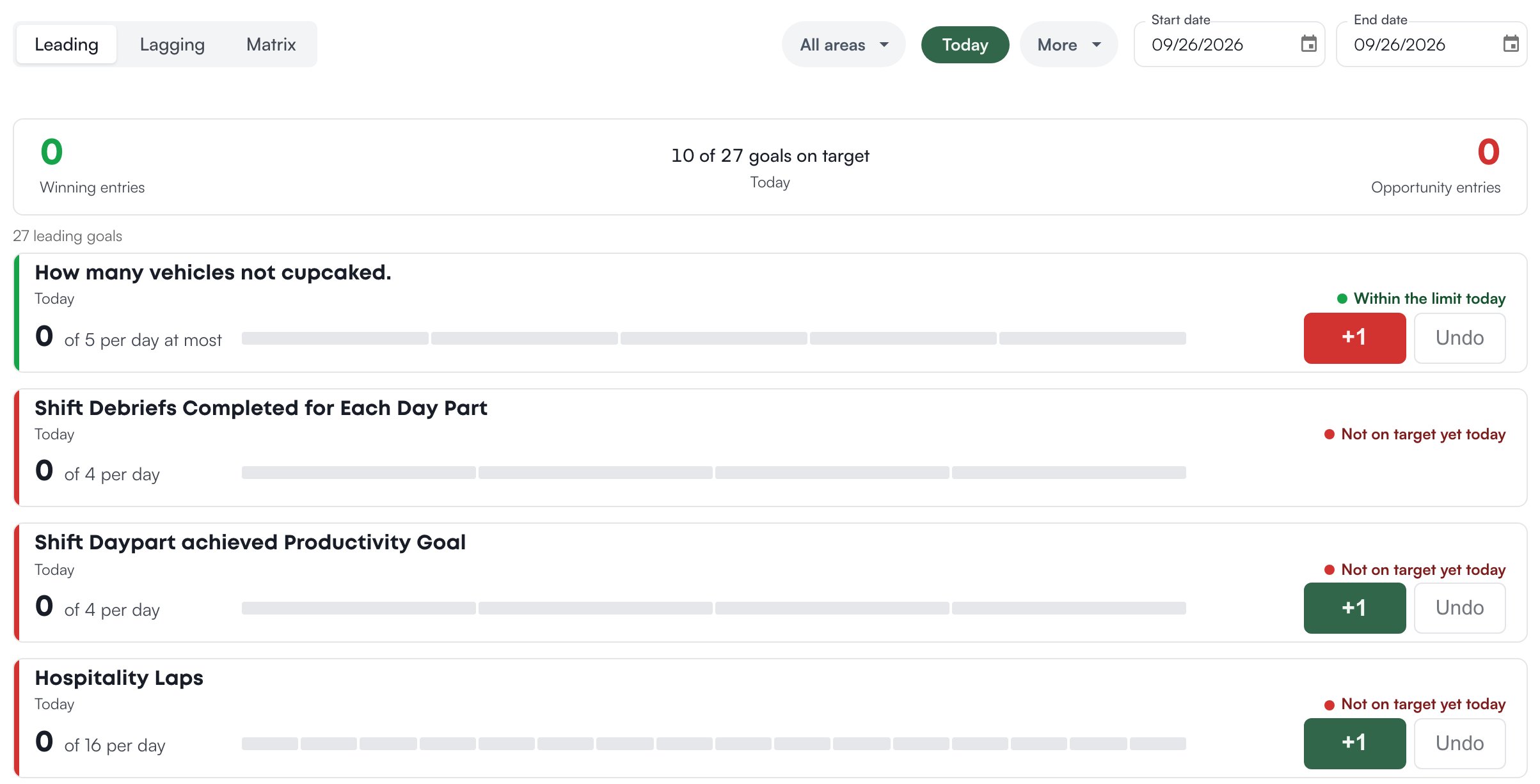 Each card shows the goal's name, the timeframe, the status, and today's count against the per-day target as a row of rectangles, one per unit of the target. On the **Today** timeframe a winning goal reads **Not on target yet today** until the count reaches the target, then **On target today**; an opportunity goal reads **Within the limit today** until the count passes the limit, then **Over the limit today**. A day the store is closed reads **Closed today**.
Pick a longer timeframe (**This week**, **Last 7 days**, **MTD**, **Last 30 days**, **Last 90 days**) and each card adds a chart of days won and lost, and the status becomes **Won 5 of 6 days**: five of the six finished days met the target. Today counts once it ends, and closed days are skipped. The **won rate** is days won out of days finished, and it colors the status: green when it meets your organization's won-rate target (80% unless changed), yellow within ten points of it, red below that.
The **Area** menu filters the list to goals tied to one area of the store (for example Front of House); **All areas** shows every goal. The choice is remembered per store in this browser. Click a goal's name, or anywhere on its card, to open it.
## Log a tally
A leading goal counted by hand (**Tally** in its editor) has **+1** and **Undo** buttons on its card and on its page. Click **+1** each time the behavior happens; the count, the rectangles and every scoreboard showing the goal move at once. **Undo** takes back the last tally you logged today. It never removes another person's tally: if you have none today, the page says **Nothing of yours to undo today**.
A goal counted automatically (**Auto tracked**) has no buttons. Its count comes from what the team already records in Levelset, for example positional excellence ratings submitted or routines completed that day, and its page says **Counted automatically from** the source.
If you don't see **+1**, your role doesn't log tallies. Ask your manager. Anyone with the permission Goals > Enter Results can tally; otherwise your organization keeps a list of the roles that can, which starts as the four roles at the top of your organization's role order. A person without the buttons still sees every count.
## Read the Lagging tab
The **Lagging** view lists one card per lagging goal you can see. Each card shows the period the number reports (**This month**, or a finished period such as August), the value against the target (**84% of 85%**), the number of survey responses when the goal has them, and a trend line over the timeframe. One result in the timeframe shows as a bar on the goal's scale instead of a line. The default timeframe is **Last 90 days**, because monthly reports land after the month closes and a short window would leave most cards empty.
Each card shows the goal's name, the timeframe, the status, and today's count against the per-day target as a row of rectangles, one per unit of the target. On the **Today** timeframe a winning goal reads **Not on target yet today** until the count reaches the target, then **On target today**; an opportunity goal reads **Within the limit today** until the count passes the limit, then **Over the limit today**. A day the store is closed reads **Closed today**.
Pick a longer timeframe (**This week**, **Last 7 days**, **MTD**, **Last 30 days**, **Last 90 days**) and each card adds a chart of days won and lost, and the status becomes **Won 5 of 6 days**: five of the six finished days met the target. Today counts once it ends, and closed days are skipped. The **won rate** is days won out of days finished, and it colors the status: green when it meets your organization's won-rate target (80% unless changed), yellow within ten points of it, red below that.
The **Area** menu filters the list to goals tied to one area of the store (for example Front of House); **All areas** shows every goal. The choice is remembered per store in this browser. Click a goal's name, or anywhere on its card, to open it.
## Log a tally
A leading goal counted by hand (**Tally** in its editor) has **+1** and **Undo** buttons on its card and on its page. Click **+1** each time the behavior happens; the count, the rectangles and every scoreboard showing the goal move at once. **Undo** takes back the last tally you logged today. It never removes another person's tally: if you have none today, the page says **Nothing of yours to undo today**.
A goal counted automatically (**Auto tracked**) has no buttons. Its count comes from what the team already records in Levelset, for example positional excellence ratings submitted or routines completed that day, and its page says **Counted automatically from** the source.
If you don't see **+1**, your role doesn't log tallies. Ask your manager. Anyone with the permission Goals > Enter Results can tally; otherwise your organization keeps a list of the roles that can, which starts as the four roles at the top of your organization's role order. A person without the buttons still sees every count.
## Read the Lagging tab
The **Lagging** view lists one card per lagging goal you can see. Each card shows the period the number reports (**This month**, or a finished period such as August), the value against the target (**84% of 85%**), the number of survey responses when the goal has them, and a trend line over the timeframe. One result in the timeframe shows as a bar on the goal's scale instead of a line. The default timeframe is **Last 90 days**, because monthly reports land after the month closes and a short window would leave most cards empty.
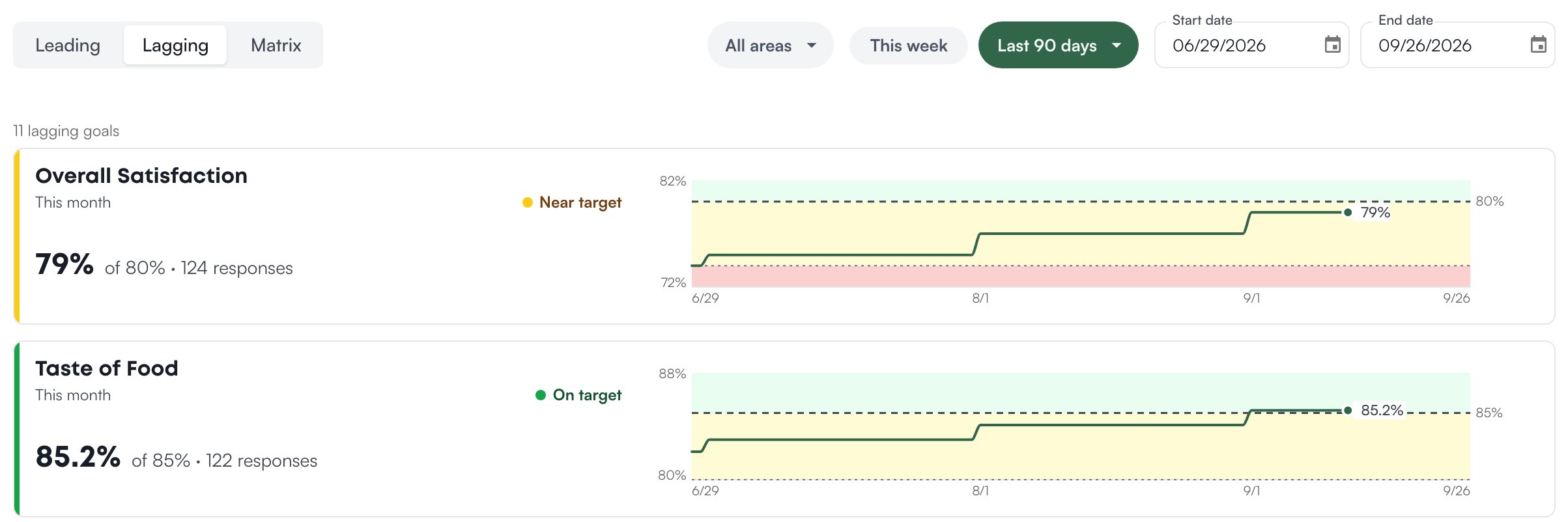 The status reads **On target** when the value meets the target, **Near target** when it falls between the target and the goal's **Minimum acceptable** value, and **Below target** past that. A goal with no minimum set is either on target or below it. A scoreboard works out its own status words for the same goal, so the two can differ; see [Scoreboards](/goals/scoreboards#add-goal-cards).
Numbers on this tab come from reports the store enters: typed in from a report someone is reading, or uploaded as a file that Levi, the assistant built into Levelset, reads. Nothing arrives from a connected system on its own. **Add data** at the top right starts that entry and asks which goal the results are for; it appears once the store has a lagging goal. See [Add data](/goals/add-data).
## Connect goals on the Matrix
The **Matrix** view draws leading goals in a column on the left and lagging goals on the right, with an arrow from each goal to the result it drives. Each arrow takes the color of the goal it starts from, so a red arrow into a result means the daily goal feeding that result is losing.
The status reads **On target** when the value meets the target, **Near target** when it falls between the target and the goal's **Minimum acceptable** value, and **Below target** past that. A goal with no minimum set is either on target or below it. A scoreboard works out its own status words for the same goal, so the two can differ; see [Scoreboards](/goals/scoreboards#add-goal-cards).
Numbers on this tab come from reports the store enters: typed in from a report someone is reading, or uploaded as a file that Levi, the assistant built into Levelset, reads. Nothing arrives from a connected system on its own. **Add data** at the top right starts that entry and asks which goal the results are for; it appears once the store has a lagging goal. See [Add data](/goals/add-data).
## Connect goals on the Matrix
The **Matrix** view draws leading goals in a column on the left and lagging goals on the right, with an arrow from each goal to the result it drives. Each arrow takes the color of the goal it starts from, so a red arrow into a result means the daily goal feeding that result is losing.
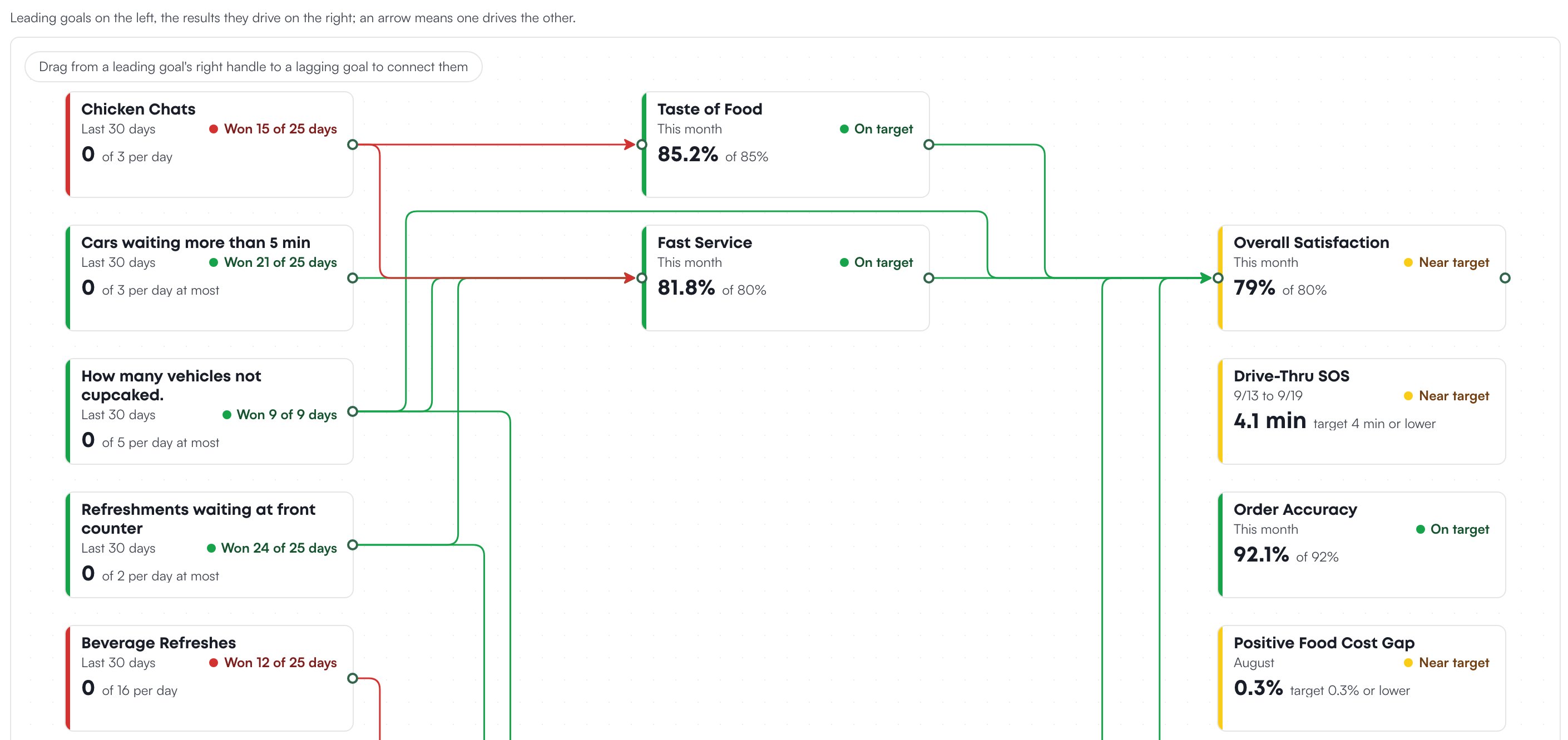 To connect two goals, drag from the circle on a leading goal's right edge to a lagging goal. A result can also drive another result: drag from a lagging goal such as **Taste of food** to the lagging goal it feeds, such as **Overall satisfaction**.
Hover over a goal to see only it and the goals linked to it. Click a goal to expand its chart and an **Open goal** button. To remove a link, click the arrow and choose **Remove link**, or select the arrow and press Delete. The same links can be set from a goal's editor, which also explains which links are refused; see [Link a leading goal to the result it drives](/goals/create-and-edit#link-a-leading-goal-to-the-result-it-drives).
The matrix colors leading goals by their won rate over its own timeframe (**Last 30 days** to start), never by a single day.
## Open a goal
Click a goal's name to open its page. **Back to goals** returns to the list on the same timeframe.
A leading goal's page shows **Today**: the count against the target, the **+1** and **Undo** buttons when your role can tally, **Days won** and **Won rate** over the timeframe, and a pace line: **Winning the range** when the won rate meets your organization's target, **Close** within ten points of it, **Losing the range** below that. **History** charts the days won and lost; change its timeframe with the control beside it. **Today's tallies** lists who logged each tally and when, or **Team** when the goal does not track who logged it.
A lagging goal's page shows the current period's value and where it came from (**from 2 reports**, **from the 8/1/26 to 8/31/26 report**), a **Trend** chart, the **Target**, the **Minimum acceptable** value (labeled **Floor** on this page), and the **Benchmark** when set (a reference line you type in, such as a top store's figure). Under the chart, **Coverage** marks which days in the timeframe a report has covered, so you can see at a glance whether the number rests on the whole period or on part of it; **To fill the gaps** names the missing report. Both are explained in [Read the coverage](/goals/add-data#read-the-coverage). **Results** lists every report entered, with its **Window**, **Value**, **Responses**, **Vs previous**, **Source** and the date it was **Entered**; tick **Show replaced results** to see results a later report replaced. Fewer than five responses is flagged **low response count**.
To connect two goals, drag from the circle on a leading goal's right edge to a lagging goal. A result can also drive another result: drag from a lagging goal such as **Taste of food** to the lagging goal it feeds, such as **Overall satisfaction**.
Hover over a goal to see only it and the goals linked to it. Click a goal to expand its chart and an **Open goal** button. To remove a link, click the arrow and choose **Remove link**, or select the arrow and press Delete. The same links can be set from a goal's editor, which also explains which links are refused; see [Link a leading goal to the result it drives](/goals/create-and-edit#link-a-leading-goal-to-the-result-it-drives).
The matrix colors leading goals by their won rate over its own timeframe (**Last 30 days** to start), never by a single day.
## Open a goal
Click a goal's name to open its page. **Back to goals** returns to the list on the same timeframe.
A leading goal's page shows **Today**: the count against the target, the **+1** and **Undo** buttons when your role can tally, **Days won** and **Won rate** over the timeframe, and a pace line: **Winning the range** when the won rate meets your organization's target, **Close** within ten points of it, **Losing the range** below that. **History** charts the days won and lost; change its timeframe with the control beside it. **Today's tallies** lists who logged each tally and when, or **Team** when the goal does not track who logged it.
A lagging goal's page shows the current period's value and where it came from (**from 2 reports**, **from the 8/1/26 to 8/31/26 report**), a **Trend** chart, the **Target**, the **Minimum acceptable** value (labeled **Floor** on this page), and the **Benchmark** when set (a reference line you type in, such as a top store's figure). Under the chart, **Coverage** marks which days in the timeframe a report has covered, so you can see at a glance whether the number rests on the whole period or on part of it; **To fill the gaps** names the missing report. Both are explained in [Read the coverage](/goals/add-data#read-the-coverage). **Results** lists every report entered, with its **Window**, **Value**, **Responses**, **Vs previous**, **Source** and the date it was **Entered**; tick **Show replaced results** to see results a later report replaced. Fewer than five responses is flagged **low response count**.
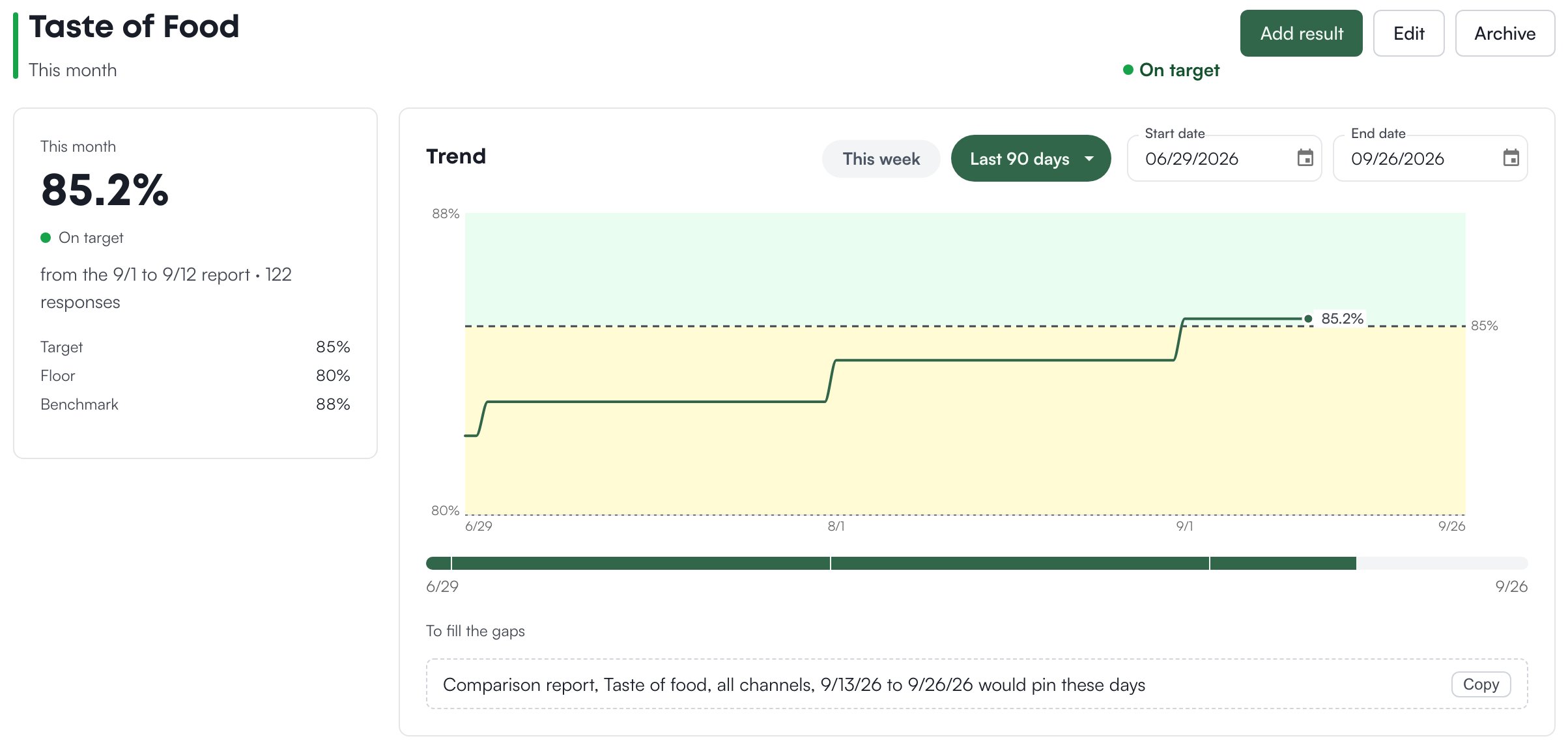 **Edit** opens the goal's editor. **Archive** asks **Archive this goal?** and then removes the goal from the list, the matrix and every scoreboard, and drops its links; its results are kept. A link to an archived goal reads **This goal is not available**.
## Who can do what
If a view or a button described on this page is missing for you, this table names the permission behind it.
| If you notice this | The permission behind it |
| ------------------------------------------------------------------------------------------------------------------------------------ | ------------------------------------------------------------------------------------- |
| No **Lagging** view, and no lagging goals on the Matrix or on scoreboards | Goals > View Lagging Goals |
| No **New leading goal** or **New lagging goal** button, no **Edit** or **Archive** on a goal, and no way to draw links on the Matrix | Goals > Manage Goals |
| No **Add data** button on the Lagging view and no **Add result** on a lagging goal | Goals > Enter Results |
| No **+1** or **Undo** on a tally goal | Goals > Enter Results, or a role on your organization's tally list |
| A goal a colleague sees is not on your list | The goal is limited to certain roles (**Roles that can see this goal** in its editor) |
If you're missing something here, ask whoever manages roles in your organization.
## Common questions
On the **Today** timeframe a winning goal is red until the day's target is reached. Pick a longer timeframe to see the won rate instead.
No report covering the current period has been entered. Open the goal and use **Add result**, or **Add data** on the Lagging view. See [Add data](/goals/add-data).
Pick the store at the top of the dashboard. A goal created with **This location only** unticked applies to every store and shows at each one with that store's own numbers.
**Edit** opens the goal's editor. **Archive** asks **Archive this goal?** and then removes the goal from the list, the matrix and every scoreboard, and drops its links; its results are kept. A link to an archived goal reads **This goal is not available**.
## Who can do what
If a view or a button described on this page is missing for you, this table names the permission behind it.
| If you notice this | The permission behind it |
| ------------------------------------------------------------------------------------------------------------------------------------ | ------------------------------------------------------------------------------------- |
| No **Lagging** view, and no lagging goals on the Matrix or on scoreboards | Goals > View Lagging Goals |
| No **New leading goal** or **New lagging goal** button, no **Edit** or **Archive** on a goal, and no way to draw links on the Matrix | Goals > Manage Goals |
| No **Add data** button on the Lagging view and no **Add result** on a lagging goal | Goals > Enter Results |
| No **+1** or **Undo** on a tally goal | Goals > Enter Results, or a role on your organization's tally list |
| A goal a colleague sees is not on your list | The goal is limited to certain roles (**Roles that can see this goal** in its editor) |
If you're missing something here, ask whoever manages roles in your organization.
## Common questions
On the **Today** timeframe a winning goal is red until the day's target is reached. Pick a longer timeframe to see the won rate instead.
No report covering the current period has been entered. Open the goal and use **Add result**, or **Add data** on the Lagging view. See [Add data](/goals/add-data).
Pick the store at the top of the dashboard. A goal created with **This location only** unticked applies to every store and shows at each one with that store's own numbers.