> ## Documentation Index
> Fetch the complete documentation index at: https://docs.levelset.io/llms.txt
> Use this file to discover all available pages before exploring further.
# Pillars
> Positional excellence ratings rolled up into five pillar scores for the store, with the trend and each person's contribution
The **Pillars** tab rolls the ratings your leaders submit up into five **pillars**, so the store can see whether it is strong on speed, on hospitality, on food, rather than only whether individuals are. The five are fixed and shared by every organization using Levelset: **Great Food**, **Quick & Accurate**, **Creating Moments**, **Caring Interactions** and **Inviting Atmosphere**, each with a weight toward the overall score. **Pillar Descriptions** on the tab explains each one. What your organization controls is which rating criteria feed which pillar.
Open **Performance > Goals** and click **Pillars**. The tab is always there; if it shows a notice instead of scores, the feature is not on for your organization, so ask your manager.
## Read the pillar scores
The cards across the top show **Pillar Score**, the store's overall score, then one card per pillar with its weight, each with a score out of 100 and a change. A card's score is the latest point of its 7-day moving average, and its change is that point against the first point in the timeframe; the table below calculates change against the period of the same length before the timeframe, so a person's card and table figures can differ. Click a pillar card to focus it: the **Change** column in the table and the **Pillar Trends** line follow that pillar until you click it again.
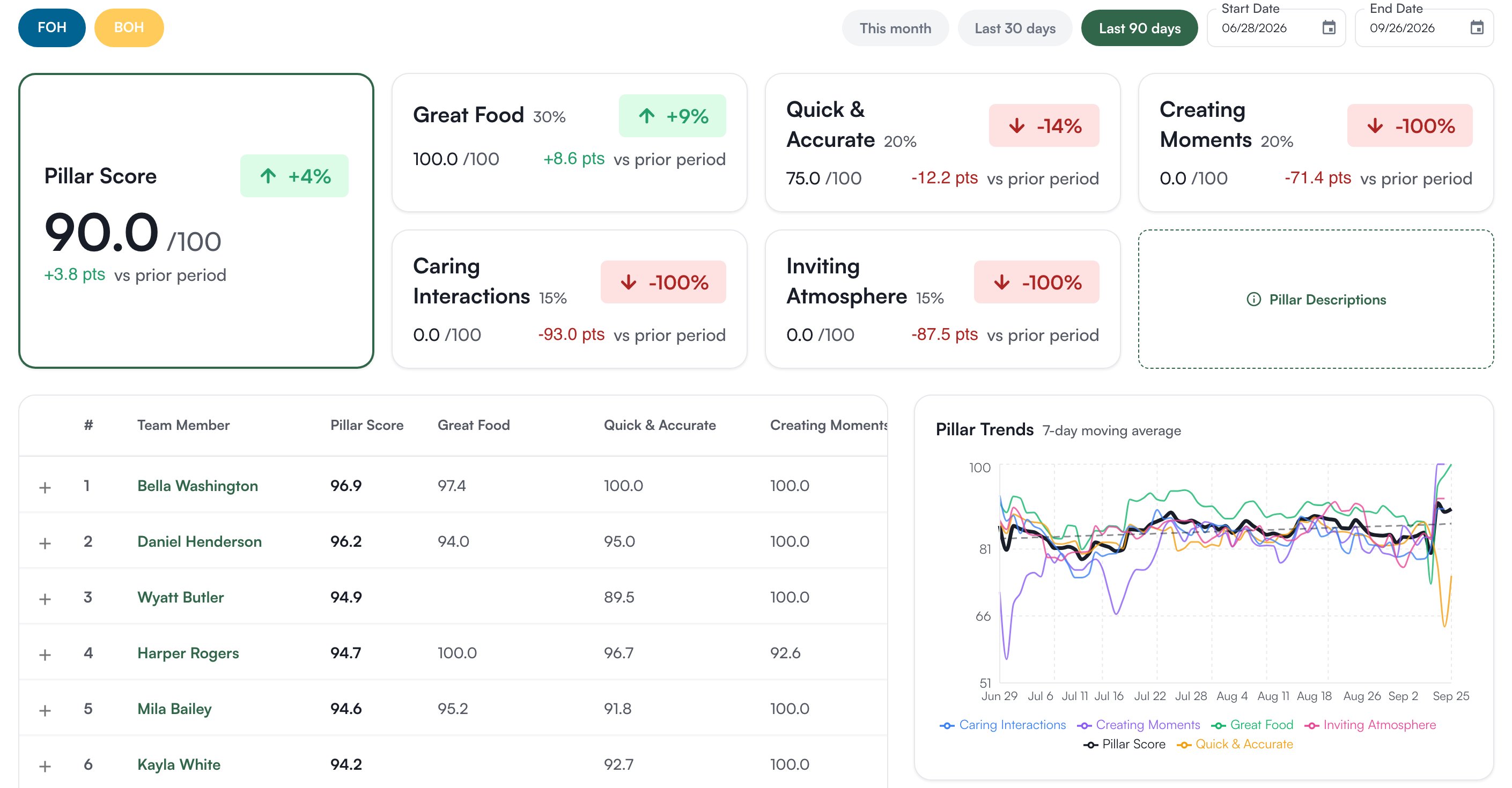 The **FOH** and **BOH** pills switch front-of-house and back-of-house positions in or out. The timeframe is **Last 90 days** to start, or **This month**, **Last 30 days**, or a **Start Date** and **End Date** of your own.
**Pillar Trends** plots each pillar's score across the timeframe as a 7-day moving average. The table ranks every rated person with their **Pillar Score**, a column per pillar, their **Change** and the number of **Ratings** behind it; people with fewer than five ratings are listed below a divider, unranked. Expand a row to see the same by position, and click a name to open the person. **Top Improvers** lists who moved most.
## Where the scores come from
Whoever manages positional excellence settings sets this. Every rating criterion on every position can carry a **Pillar 1** and, optionally, a **Pillar 2**, under **Organization Settings > Positional Excellence** on the **Positions** tab: expand a position and each criterion row has the two columns. See [Positional Excellence settings](/organization-settings/positional-excellence#write-the-criteria).
When a leader rates someone, each criterion's score flows to the pillars it is tagged with. A criterion tagged with both sends 60% of its weight to Pillar 1 and 40% to Pillar 2, so put the pillar the criterion is mostly about first. Ratings are on a 1 to 3 scale and shown as 0 to 100.
A criterion with **Pillar 1** set to **None** counts toward no pillar. If the numbers look thin or a pillar is empty, the usual cause is untagged criteria, not missing ratings.
A pillar nobody has been rated on is left out of the overall score rather than counted as zero. Retagging changes which past ratings feed which pillar, so expect the scores to move after a change.
## Who can do what
The Pillars tab has no permission of its own; anyone who can open the Goals page sees it.
| If you notice this | The reason |
| ---------------------------------------- | ------------------------------------------------------------------ |
| The tab shows a notice instead of scores | Your organization does not have the feature turned on |
| A person's row is missing | They have no ratings in the timeframe at the positions switched on |
If you're missing something here, ask whoever manages roles in your organization.
## Common questions
No criterion is tagged to it, or nobody has been rated on the criteria that are. Check the **Pillar 1** and **Pillar 2** columns in Positional Excellence settings.
No. The five are fixed. The choice is in which criteria you tag to them.
Yes. A goal's editor has a **Pillars** field, and an auto-tracked leading goal can count a pillar's daily score. See [Create and edit goals](/goals/create-and-edit).
The **FOH** and **BOH** pills switch front-of-house and back-of-house positions in or out. The timeframe is **Last 90 days** to start, or **This month**, **Last 30 days**, or a **Start Date** and **End Date** of your own.
**Pillar Trends** plots each pillar's score across the timeframe as a 7-day moving average. The table ranks every rated person with their **Pillar Score**, a column per pillar, their **Change** and the number of **Ratings** behind it; people with fewer than five ratings are listed below a divider, unranked. Expand a row to see the same by position, and click a name to open the person. **Top Improvers** lists who moved most.
## Where the scores come from
Whoever manages positional excellence settings sets this. Every rating criterion on every position can carry a **Pillar 1** and, optionally, a **Pillar 2**, under **Organization Settings > Positional Excellence** on the **Positions** tab: expand a position and each criterion row has the two columns. See [Positional Excellence settings](/organization-settings/positional-excellence#write-the-criteria).
When a leader rates someone, each criterion's score flows to the pillars it is tagged with. A criterion tagged with both sends 60% of its weight to Pillar 1 and 40% to Pillar 2, so put the pillar the criterion is mostly about first. Ratings are on a 1 to 3 scale and shown as 0 to 100.
A criterion with **Pillar 1** set to **None** counts toward no pillar. If the numbers look thin or a pillar is empty, the usual cause is untagged criteria, not missing ratings.
A pillar nobody has been rated on is left out of the overall score rather than counted as zero. Retagging changes which past ratings feed which pillar, so expect the scores to move after a change.
## Who can do what
The Pillars tab has no permission of its own; anyone who can open the Goals page sees it.
| If you notice this | The reason |
| ---------------------------------------- | ------------------------------------------------------------------ |
| The tab shows a notice instead of scores | Your organization does not have the feature turned on |
| A person's row is missing | They have no ratings in the timeframe at the positions switched on |
If you're missing something here, ask whoever manages roles in your organization.
## Common questions
No criterion is tagged to it, or nobody has been rated on the criteria that are. Check the **Pillar 1** and **Pillar 2** columns in Positional Excellence settings.
No. The five are fixed. The choice is in which criteria you tag to them.
Yes. A goal's editor has a **Pillars** field, and an auto-tracked leading goal can count a pillar's daily score. See [Create and edit goals](/goals/create-and-edit).