


File an infraction or record an action from the dashboard
Most infractions are filed during the shift, from the Levelset app (the phone app leaders sign in to) or from the store’s mobile web app. To file one from your desk, click Submit Infraction at the top of Performance > Discipline, pick the Team member, and fill in the form: the infraction, the date, the Documenting Leader (you, unless you change it), whether the team member has been told, notes and attachments. This form asks for no leader code and no signatures. Record Action works the same way for an action that was carried out, whether or not Levelset recommended it. Either button also sits on the person’s profile, on its Discipline tab, as Infraction and Action. The top role in your organization cannot receive an infraction or an action.Clear what is waiting
The top of the page holds three lists, each collapsed with its count. Infractions This Week is everything filed at this store in the last 7 days, one card per infraction with the team member, the infraction, the date, who filed it, its points and whether the person has been told. Missing Acknowledgements is every infraction, however old, whose team member has not been told about it. Once you have had the conversation, click Mark as Notified on the card. This list has no time limit, so a stack here can go back months. Required Disciplinary Actions lists each person whose current points have reached a threshold, with the action recommended; the team member in the example is here. Record Action opens the form to record what was done; it can also be recorded in the Levelset app, see Record an action in the Levelset app. Dismiss asks why, keeps the reason with the recommendation, and the dismissal is listed under Dismissed recently with who dismissed it and when; the 25 most recent stay listed. A recommendation is live rather than stored: it disappears on its own when points drop below the threshold.Record an action in the Levelset app
When a team member’s points reach a threshold, everyone at that store whose role holds Discipline > Record Actions gets a task in the Levelset app, the phone app leaders sign in to: Record a disciplinary action. It opens a short brief: the action your rules call for, the person’s points against the threshold, a summary and their record in the points window. Record action opens the action form; Dismiss asks for a short reason, at least 5 characters, which stays on the record. The task stays until the action is recorded or dismissed; it never drops off by date. To record an action without a task, tap the + button and choose Record Disciplinary Action. It appears when your role holds Discipline > Record Actions.Read the Team Members table
Every active team member at this store is listed, highest points first.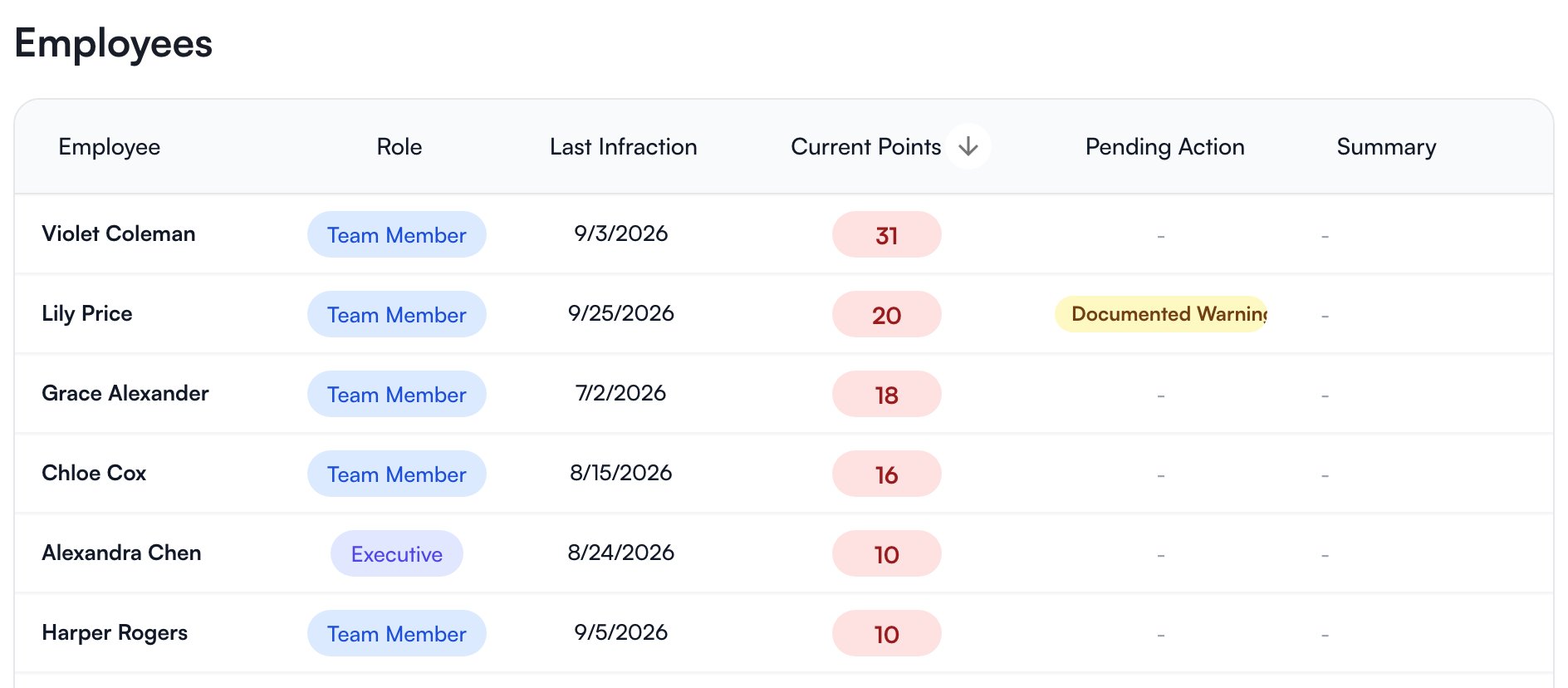
Current points count only infractions filed at stores you have access to. For a person who also works at a store you cannot see, the number leaves those out.
Disciplinary Actions to the right is your organization’s list of action types and the points at which each is recommended. It is a reference copy of what is set on Discipline rules; Configure Actions opens those settings. Below it, the Discipline Alerts card sets up an automation that sends a notification when an infraction or action is filed; see Automations.
Read one person’s discipline history
Click the person’s row on Performance > Discipline, or open them from People > Team & Access, and go to the Discipline tab of their profile. The heading names the window you are looking at, for example Current Period (last 90 days) or Current Period (since Jul 1), with the count of Infractions and their Discipline Points in it. Infractions lists each one in the window, with its date, its points, and Notified or Not notified. Click one to open it: the store, the person, the date, the Documenting Leader, the infraction and its points, the notes, the notified switch and any attached photos or documents. Signatures collected on the mobile web app are not shown here; the PDF from Reporting marks an infraction as signed. Disciplinary Actions lists the actions recorded against the person, and a pending recommendation sits at the top of that column with Dismiss and Record Action on it. An empty list reads No infractions in the current period, which means nothing inside the window, not a clean history. You can open the Discipline tab for yourself and for anyone whose role is below yours, as long as their home store is one you have access to or they have discipline filed at one of your stores. Organization admins can see everyone. A person whose role is the same as yours or above it in the role order shows no Discipline tab, whatever your permissions.Correct or remove an infraction or action
Open the infraction or action from the person’s Discipline tab. An infraction can have its type, date, leader, points, notes, acknowledgement and attachments changed, or be deleted; an action can have its type, date and notes changed, or be deleted. Correct a mistake this way rather than filing a second infraction to cancel the first. Both need their own permission, named in the table below.Who can do what
If a button or a tab described on this page is missing for you, this table names the permission behind it.
If you’re missing something here, ask whoever manages roles in your organization to turn it on. See Roles.
Common questions
Someone's points dropped and nobody removed anything.
Someone's points dropped and nobody removed anything.
An infraction stopped counting when it passed out of the points window. The infraction still exists and appears in the PDF from Reporting; it no longer adds to current points. The window is set on Discipline rules.
A recommended action vanished.
A recommended action vanished.
Same cause. Required Disciplinary Actions lists only people whose current points still meet a threshold.
Someone is not in the Team Members table.
Someone is not in the Team Members table.
It lists active team members at the store selected at the top of the sidebar. Check that they are active and belong to this store on People > Team & Access.
Can I undo a dismissal?
Can I undo a dismissal?
No. It stays under Dismissed recently with its reason, and if the person’s points reach a threshold again a new recommendation appears.
Where do I print someone's discipline history?
Where do I print someone's discipline history?
On Performance > Reporting, which builds a PDF per person. See Reporting.