

Before you file
Talk to the person first. An infraction filed without telling them waits in Missing Acknowledgements on the Discipline page until someone marks them notified. Pick the right infraction. The list is grouped by point value, and the points come from your organization’s list, not from anything typed on the form. Infractions with negative points, for covering a shift or staying late, go through this same form.File in the Levelset app
- Tap the + button and choose Record Infraction. It appears when your role holds Discipline > Submit Infractions.
- The leader starts on your own name. There is no leader code in the app. The leader list holds the roles ticked on the Access tab of Discipline rules.
- Pick the team member, the date and the infraction. The points fill in from your organization’s list.
- Tick the acknowledgement box if they are there and you have told them.
- Add notes and any attachments.
- Sign as the leader, and have the team member sign when the infraction asks for it.
- Submit.
File in the mobile web app
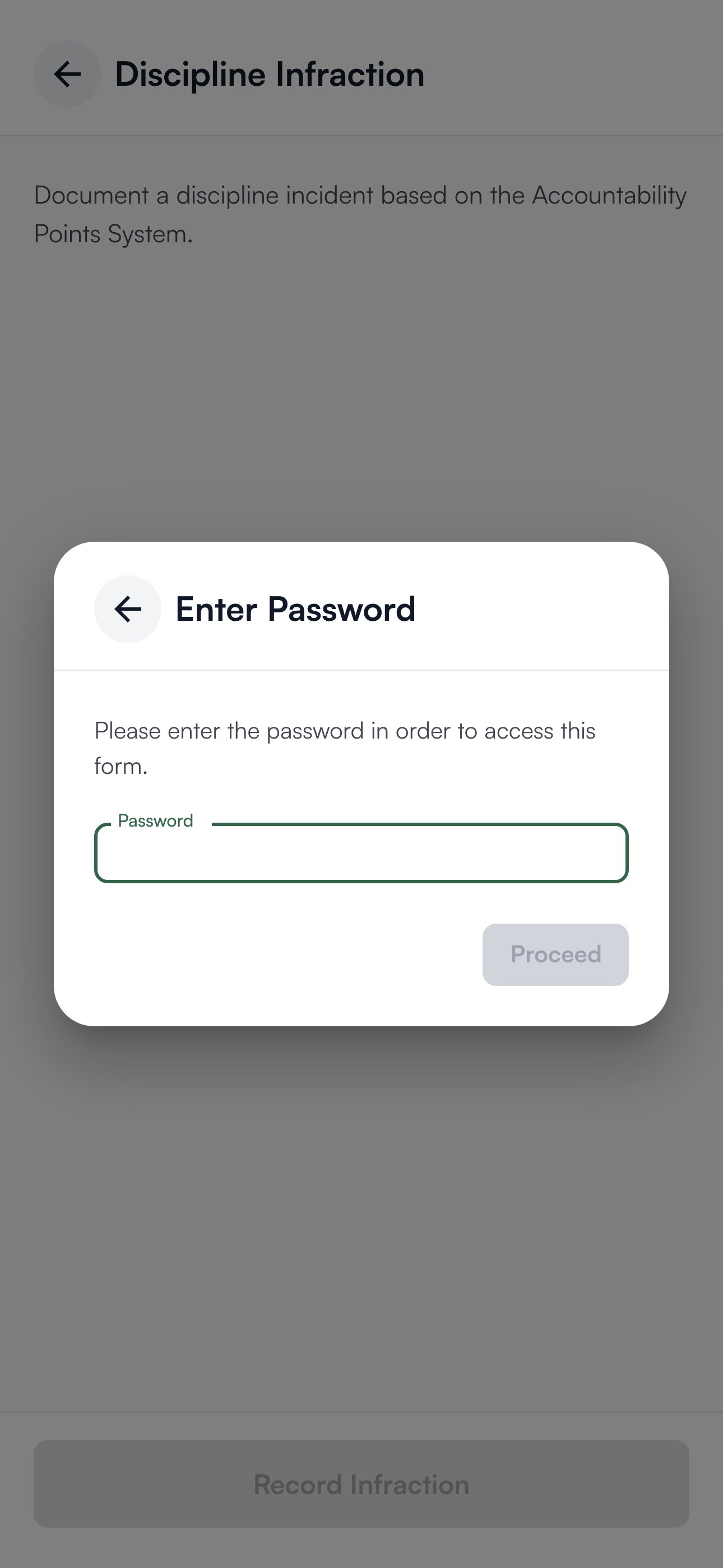
Use the link or QR code your store keeps posted or on its shared tablet, or find it under Organization > Set up > Team links in the dashboard. On the home screen, tap Discipline Infraction.- At Enter Password, type the store’s leader code in the Password box and tap Proceed. The leader code is your store’s discipline form password; anyone whose role holds Mobile App > View Form Password can read it under Organization > Set up > Team links.
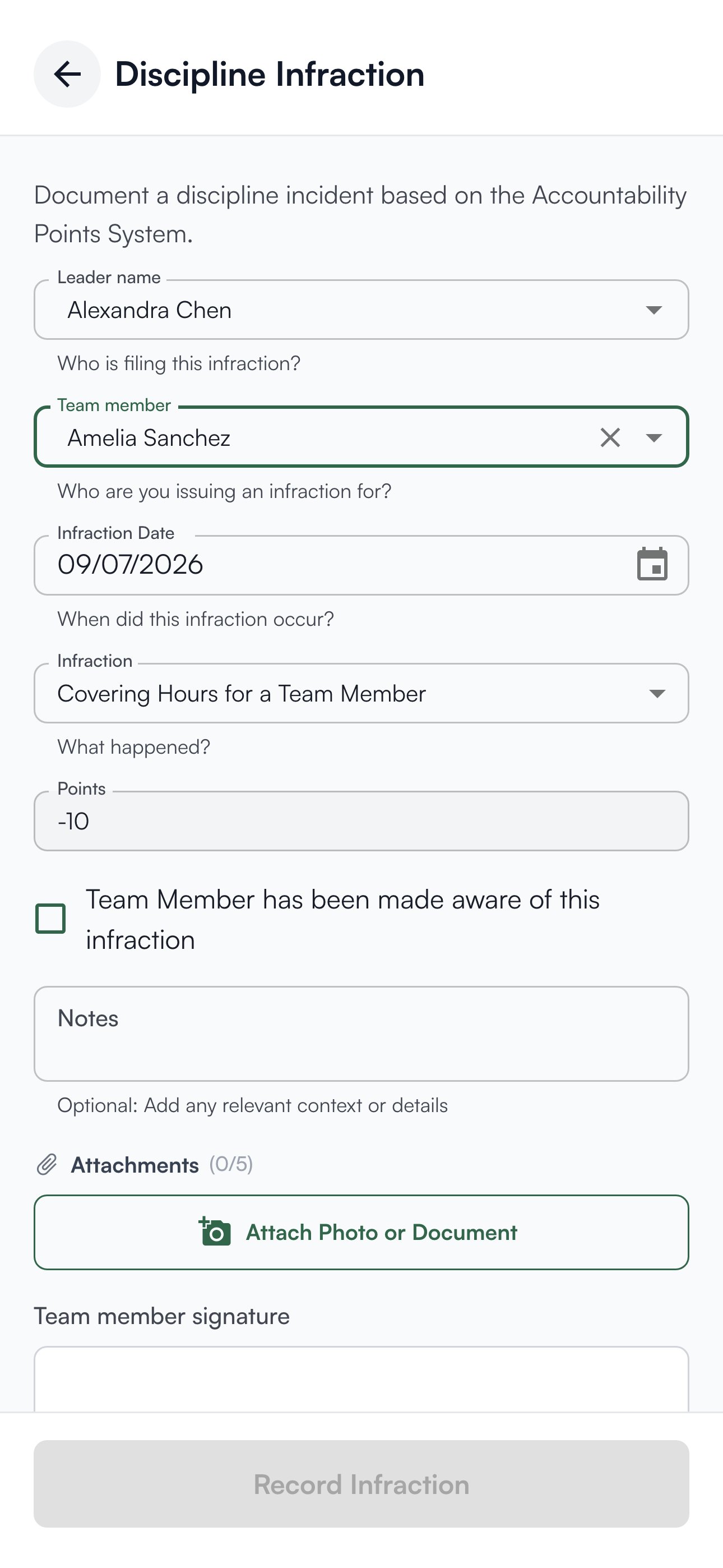
- Pick your own name under Leader name, and the person it concerns under Team member.
- Set the Infraction Date. It starts at today; change it for something from an earlier shift.
- Pick the Infraction, the tardy in the example. Points fills in and can’t be typed over.
- Tick Team Member has been made aware of this infraction if you have already told them.
- Add Notes, and any Attachments: up to 5 files, 10 MB each, as JPEG, PNG, HEIC, WebP or PDF.
- Sign under Leader signature, and have the team member sign under Team member signature when it is asked for.
- Tap Record Infraction.
Signatures
The leader signature is always required, in the app and in the mobile web app, whatever the Leader signature box on Discipline rules says. The team member signature is required on any infraction your organization marked as needing it, and in the mobile web app also when you tick the acknowledgement box.Write the note
The note is what someone reads in six months when the details have faded. Be specific: “Clocked in at 9:14 for a 9:00 shift” beats “late again”. Be factual: describe what happened, not what you concluded about the person.Who can do what
In the Levelset app, filing takes Discipline > Submit Infractions, and the leader list narrows who can be named. The mobile web app form needs no permission; the Leader name list decides who can file. These do.
If you’re missing something here, ask whoever manages roles in your organization to turn it on. See Roles.
Common questions
My name is not in the Leader name list.
My name is not in the Leader name list.
Your organization chooses which roles can file, on the Access tab of Discipline rules. That isn’t a permission of yours: anyone whose role holds Discipline > Manage Access Settings can tick your role there.
The leader code doesn't work.
The leader code doesn't work.
The leader code belongs to the store, not to you, and it may have changed. Anyone whose role holds Mobile App > View Form Password can read the current one on Organization > Set up > Team links. It is changed there by roles holding Mobile App > Change Form Password or Mobile App > Manage Discipline Form Password, or on the Access tab of Performance > Set up > Discipline rules by roles holding Discipline > Manage Access Settings.
My attachment did not save.
My attachment did not save.
Attachments upload after the infraction itself is saved, so the infraction is recorded either way. Open it from the person’s Discipline tab on the dashboard, check the attachment is there, and add it again if not.
Can I change the points on one infraction?
Can I change the points on one infraction?
Not on the form: the same infraction always carries the same value. A saved infraction can be changed on the dashboard by someone whose role holds Discipline > Delete/Modify Infractions; see Correct or remove an infraction or action.
I filed it against the wrong person.
I filed it against the wrong person.
Open it from the person’s Discipline tab on the dashboard and delete it, then file it again for the right person. Deleting takes Discipline > Delete/Modify Infractions. Don’t file a second infraction to cancel the first.
Do I have to tick the acknowledgement box?
Do I have to tick the acknowledgement box?
No. An unticked one waits in Missing Acknowledgements on the Discipline page until someone clicks Mark as Notified. Tick it once you have told them, and be ready for their signature.