

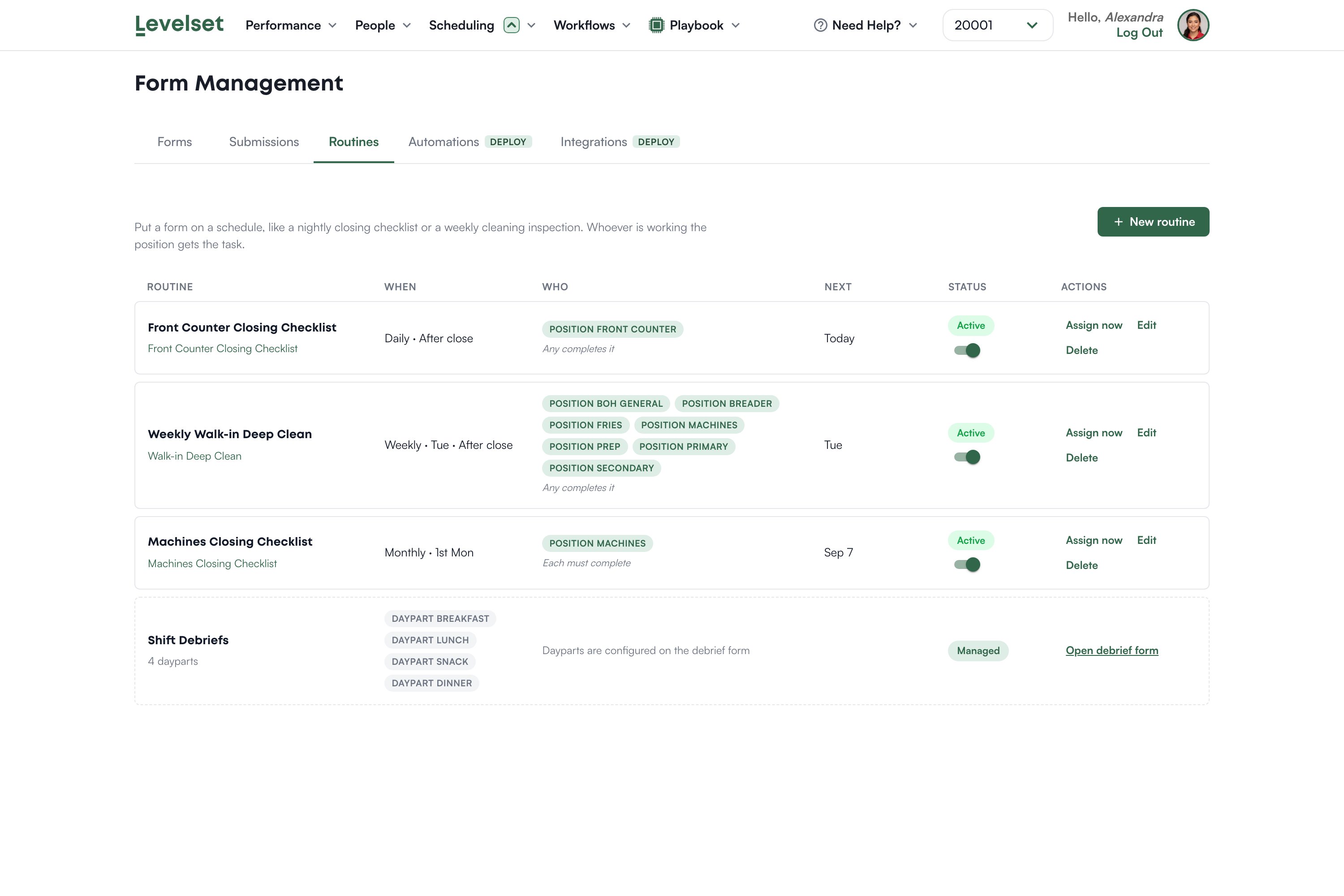
Reading the list
Assign now pushes the task out immediately rather than waiting for the schedule, which is useful the first time you set one up and want to see it land.
Who gets the task
You attach a routine to positions, not to people. Whoever is working Front Counter tonight gets the Front Counter closing checklist. That is the design: it keeps working when the schedule changes, and it does not break when someone is off. Two modes matter:- Any completes it means one person finishing closes it out for everyone.
- Each must complete means every person in those positions has their own copy to finish.
Creating one
1
Click New routine
Give it a name that reads like an instruction.
2
Choose the form
Only forms of an eligible type appear here. If yours is missing, see below.
3
Set the cadence
Daily, weekly on chosen days, or monthly, with a time window such as after close.
4
Choose the positions
And whether any one person completes it or each must.
5
Turn it on
The Status toggle controls whether it is running.
If your form is not in the list
The most common problem with routines, and it is not obvious. Routines only offer custom forms, and a form’s type comes from the group it was built in. A checklist created inside the Evaluations group is an evaluation as far as Levelset is concerned, so it never appears here. If the picker tells you there are no custom forms available, that is what has happened. It is an easy mistake to make, because the New Form dialog preselects the first group alphabetically and that is usually Evaluations. Move the form into an ordinary group and confirm the type change when asked. See Forms.Shift Debriefs
You may see a Shift Debriefs entry that looks like a routine but is marked Managed, with dayparts rather than a cadence you chose. That one is configured on the debrief form itself rather than here, and the link on its row takes you there.Timing
Routines become due against your location’s local time. A location with no timezone set falls back to US Eastern, so a Texas restaurant would see its closing checklist an hour early. If a routine appears at the wrong hour, or never appears, the location’s timezone is the first thing to check with your Levelset representative.Common questions
The routine never showed up for my closing team.
The routine never showed up for my closing team.
Check three things in order: the routine is Active, the positions on it match who was actually working, and the location’s timezone is right.
Can I assign a routine to a person rather than a position?
Can I assign a routine to a person rather than a position?
No, and that is deliberate. Positions keep working when the roster changes.
What happens if nobody completes it?
What happens if nobody completes it?
It stays outstanding. Levelset does not escalate it on its own.
Can I run one immediately?
Can I run one immediately?
Yes. Use Assign now on the routine’s row.