

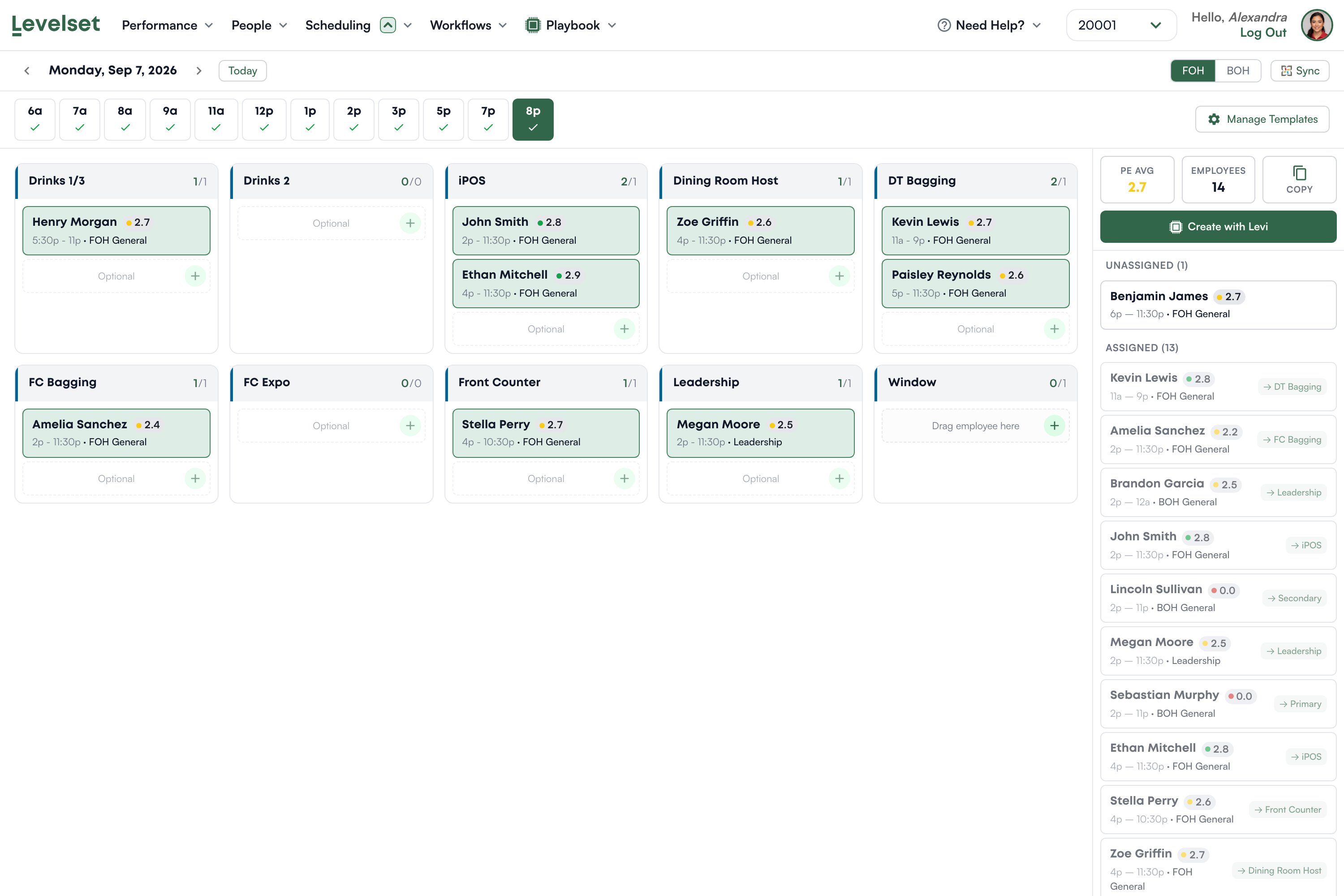
How the board is laid out
Pick a date at the top, and an area with the FOH and BOH toggle. Along the row beneath are your time blocks, for example 6a through 8p. A tick on a block means it has been built. You build one block at a time, because who you want on Front Counter at 7am is not who you want at 8pm. The main area shows one card per position, each with a count like2/1, meaning how many people are placed against how many that position needs.
Each placed person shows their name, their rating in that position, and their shift times. The colored dot is their band: red for Not Yet, amber for On the Rise, green for Crushing It. That is the whole point of the board. You are not just filling slots, you are seeing at a glance whether the person you dropped into iPOS is actually strong there.
Slots marked Optional are extra capacity beyond what the position requires. Empty ones invite you to drag someone in.
The panel on the right
PE Avg is the average rating of everyone currently placed, which is a quick read on how strong this block is. Employees counts who is scheduled. Below that, everyone scheduled for the block, split into Unassigned and Assigned. Each shows their rating and, once placed, which position they are in. Drag a person from here onto a position card to place them. Somebody sitting in Unassigned is scheduled and has nowhere to stand. That is the list to empty.Building a setup
1
Pick the date and the area
Then choose the time block you are building.
2
Place people into positions
Drag from the right-hand list onto a position card, or use the plus on a slot.
3
Watch the ratings, not just the count
A full board of Not Yet ratings is a staffed shift that will still go badly. Move your strong people to the positions that carry the shift.
4
Repeat for the next block
The ticks along the top show which blocks are done.
Where the people come from
The board reads your schedule, and only your schedule. Someone appears because they have a shift that overlaps the block you are building. There is no way to place a person who is not scheduled, which means an accurate week has to exist before a setup can be built at all. If a person is missing, check the schedule first, then check their area on the Roster: the board is split into FOH and BOH, so a team member with no area set will not appear on either. See the Roster.A team member who has never been rated in a position shows 0.0 in red. That is “no ratings yet”, not a failing score. Rate them and a real number replaces it.
Templates
Manage Templates is where the positions and time blocks themselves are defined. A template is the shape of your day: which positions exist for an area and which blocks you build. The board is that shape filled in with actual people. Change a template when your restaurant genuinely changes, not to fix one awkward shift.Create with Levi
Create with Levi builds a suggested setup from who is scheduled and how they are rated. It is available on both plans, and it is a starting point you then adjust rather than a decision. On Deploy you also get a free-text box for instructions, so you can ask for something specific like keeping a new hire off the window, and you can iterate on the result. Nothing is submitted anywhere when you use it. It arranges people you already have.Common questions
Someone scheduled is not on the board.
Someone scheduled is not on the board.
Check their area on the Roster. The board is FOH or BOH, and a team member with neither set appears on neither.
A position shows 0/0.
A position shows 0/0.
The template does not require anyone in that position for this block. Adjust the template if that is wrong.
Somebody has no rating shown.
Somebody has no rating shown.
They have not been rated in that position yet. Placing them is a judgement call, and it is a good prompt to get them rated.
Can I print the setup?
Can I print the setup?
There is no print or export built in. Copy reuses a block you have already built. If you need it on paper, print the page from your browser.
Someone shows 0.0 in red.
Someone shows 0.0 in red.
They have no ratings in that position yet. It is an absence, not a bad score.
Do I have to rebuild this every day?
Do I have to rebuild this every day?
Yes, because who is scheduled changes every day. Copy speeds up blocks that repeat.